Why Am I ineligible to sell on noon?
To become a seller on any platform, you need to provide
specific documentation to ensure your business is legally compliant and
eligible to operate. Incomplete or incorrect documentation can make you
ineligible to sell.
In this article, we'll explain why you might be tagged as
ineligible to sell on Noon and how to resolve these issues.
Reasons for Ineligibility on Noon
There are two main reasons why you might be ineligible to
sell on Noon:
- Your Commercial Registration (CR) activities are not supported.
- Your VAT certificate is not updated (for international sellers).
1. Unsupported Commercial Registration Activities
If your commercial registration does not include activities such as Sales, Trading, Manufacturing, or Distribution/Wholesale, you have two options:
Scenario 1: Updating Activities on Your Current CR
If you need to update the activities on your existing CR while keeping your TL number unchanged, simply follow the same instructions outlined in this article.
Scenario 2: Applying for a New Commercial Registration
If you are applying for a new CR, follow these steps:
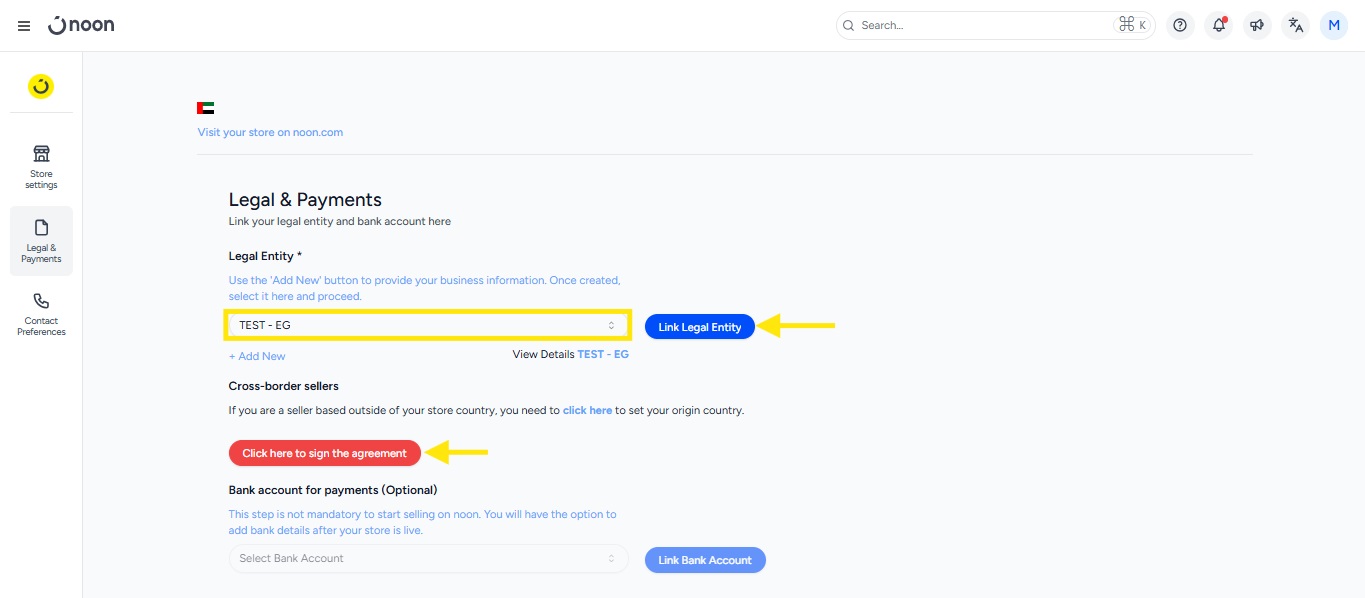
- Go to the Store Management section, then click on Legal & Payments section.
- Under the Legal and Payment section, click on "Add new" to add a new legal entity and submit it for approval.
- Send an email to seller@noon.com to delink the old legal entity from your store. You will be notified by email once this is done
- Link the new legal entity to your store from the Legal and Payment section, select the authorized signatory, and sign the agreement.
- If the submitted documents meet the requirements, your eligibility will be approved; otherwise, it will be rejected.
- If the submitted documents meet the requirements, your eligibility will be approved; otherwise, it will be rejected.
2. VAT Certificate Not Updated (International Sellers)
As international sellers, ensure you have an international trade license that satisfies the CR activities requirement mentioned above.
Then you need to update the Legal Entity with the VAT certificate issued by the local governing authority of the country where you wish to sell your products.
Please refer to the article to understand how you can update your VAT details.